If the Ampler feature ‘Send selected slides/worksheets/document’ is not working in PowerPoint, Excel, or Word, the issue may be caused by inconsistent default app settings in Windows.
Ampler uses the default email application configured in Windows.
In some cases, after enabling New Outlook, Windows may continue to recognize Outlook Classic as the default email application. This can prevent Ampler from opening New Outlook when using the send feature.
To resolve the issue:
- Open the Windows Start menu
- Search for and open Default Apps
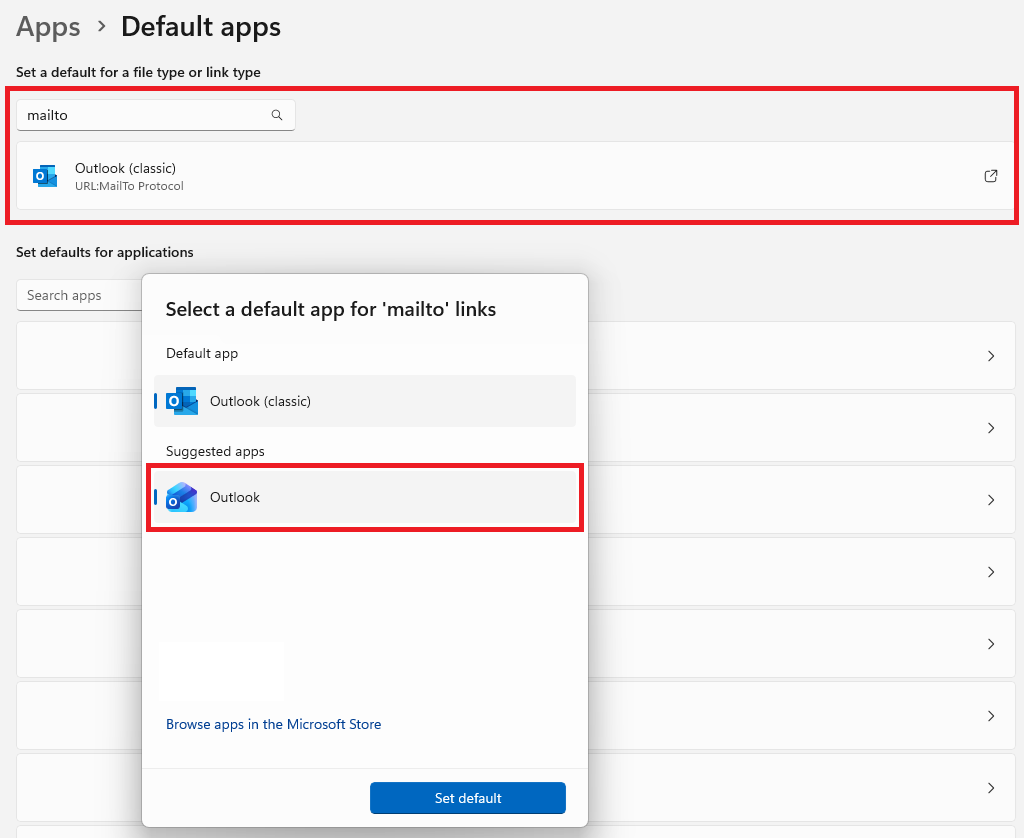
- Search for mailto
- Change the default application for mailto to Outlook (without ‘Classic’ in the name)
See the screenshot below for reference.
Once this setting has been updated, Windows (and therefore Ampler) should recognize New Outlook as your default email application.