Template management in PowerPoint, Word and Excel
Keep every presentation, document, and workbook on brand without chasing your colleagues
Brand and template owners carry the visual identity of the entire organisation, and every off-brand deck that leaves the building is a small dent in it. Ampler puts your templates and approved content directly in PowerPoint, Word, Excel, and Outlook, so the right template is also the easiest one to use.
Give everyone the right template, directly in Office
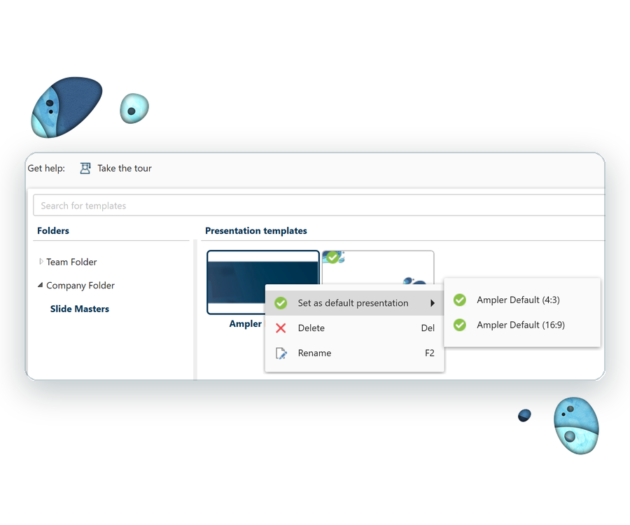
- Collect your slide masters and your document and workbook templates in one company library, with a default master for every new presentation
- Let your users start new presentations, documents and workbooks from the company template with ‘New’, e.g., Ctrl+Shift+N in PowerPoint
- Keep brands and sub-brands apart in their own folders, just as Danske Bank does for its five sub-brands
- Apply the company template to an existing deck to bring older presentations up to date
Make approved content the easiest content to find
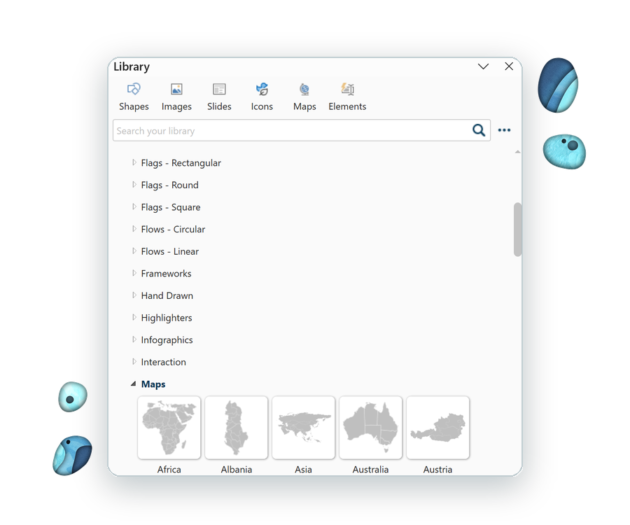
- Gather slides, shapes, images, icons, tables, and infographics in a library panel inside PowerPoint, Word, Excel, and Outlook
- Help your users find the approved slide with search filters and folders, instead of digging through old presentations
- Decide where inserted content lands with folder rules, e.g., headers at exactly the right height on the slide
- Update content once in the library, and everyone has the new version straight away
Let your templates fill themselves in
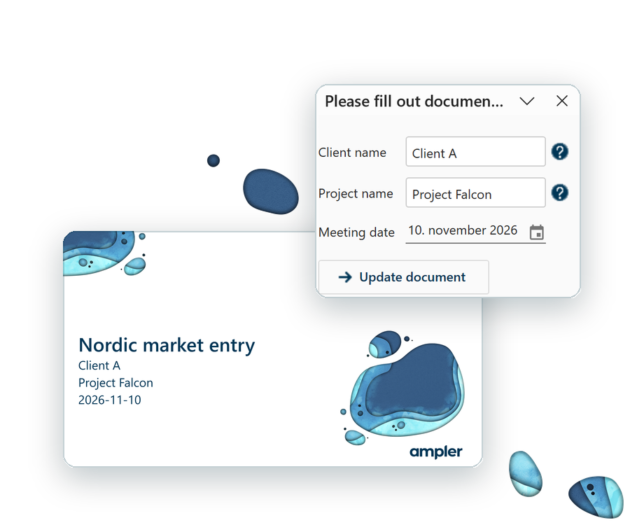
- Define dynamic fields in your templates, e.g., client name, project name, and meeting date, and let users fill them in once for the whole file
- Fill in fields automatically from user information such as Active Directory, so names and titles come straight from your directory
- Use dynamic templates that adapt to different languages and aspect ratios
Catch off-brand formatting before a file is sent
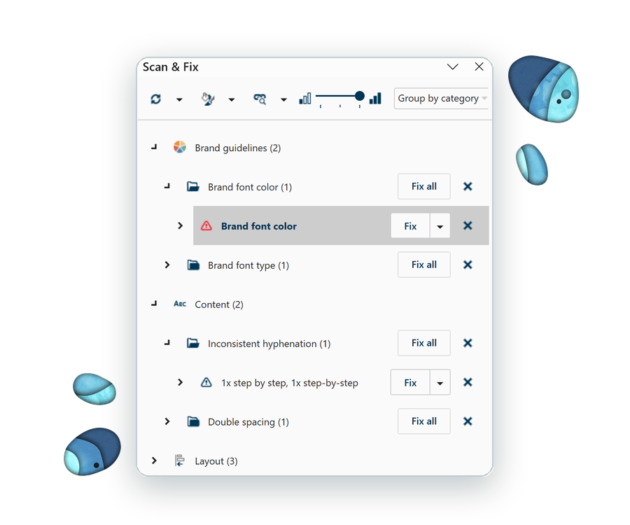
- Let ‘Scan & Fix’ check presentations against the brand rules you set, e.g., fonts, colours, and templates, and check documents and workbooks for inconsistencies and errors
- Fix issues one at a time, or a whole category at once with ‘Fix all’
- Set the rules centrally in company settings, together with the toolbar and shortcuts your users get
- Manage approved email signatures centrally in Outlook
Template management with Ampler in short
Ampler is an add-in for Microsoft PowerPoint, Word, Excel, and Outlook that manages a company’s templates and approved content centrally. Administrators keep slide masters, document and workbook templates, and brand content in one library connected to SharePoint, network drives, or a digital asset management system. Users start new files from the company templates and insert approved content directly in Office, and ‘Scan & Fix’ checks presentations against the company’s brand rules. Ampler is made in Copenhagen by former management consultants and is used by more than 600 customers.
How companies use it
- Oterra uses Ampler with its Bynder asset library, so employees find approved templates and assets inside PowerPoint, Word and Excel. “Ampler has enhanced quality, efficiency, team collaboration, and asset distribution, offering easy access to branded content and productivity tools for Office365.” Mikael Kragh, CIO, Oterra.
- Danske Bank manages and distributes templates and content for five sub-brands with Ampler, with security requirements set by a financial institution.
- Velliv manages templates and email signatures centrally with Ampler Library and Ampler’s signature management, with visuals and icons from Frontify inside Outlook, PowerPoint, Excel and Word. “Employees can quickly access approved templates and assets, which has significantly improved both brand consistency and day-to-day efficiency.” Sandra Emilie Doig La Cour, Senior Brand and Marketing Manager, Velliv.
- A global healthcare company manages templates and email signatures for several sub-brands with Ampler Library and signature management.
Book a demo to see a company setup, or try Ampler free for 30 days.
Overview for IT and brand owners
| Need | How Ampler handles it | Guide |
|---|
| Company slide masters | Slide masters stored in the library, with a default master for new presentations | add slide masters |
| New files from templates | New presentations, documents and workbooks start from the company’s templates in the library | PowerPoint, Word, Excel |
| Approved content | Slides, shapes, images, icons, tables, stamps, infographics and dynamic slides, searchable inside Office | using the library |
| Central updates | Administrators update library content once and every user gets the new version | library sources |
| Where content comes from | SharePoint, network shares, local folders and digital asset management systems | Bynder, Frontify, Brandfolder, Brandfetch |
| Placement rules | Folder rules decide where inserted content lands, for example headers at the right height | folder rules |
| Company toolbar | Administrators set the Ampler toolbar and shortcuts for all users | customise the toolbar |
| Checks before sending | Scan & Fix checks presentations against the brand rules the administrator sets, and documents and workbooks for inconsistencies and errors | Scan & Fix rules |
| Brand formats in Excel | Company colours, number, percentage and date formats applied from the ribbon | company colours, formats |
| Email signatures | Approved email signatures managed centrally in Outlook | Ampler for Outlook |
Deployment and administration
Frequently Asked Questions
How does Ampler keep PowerPoint and Word files on brand?Ampler puts your slide masters, document templates, slides, and approved content in a library directly in PowerPoint, Word, Excel, and Outlook. Users start new files from the company templates and insert approved content, administrators update the library once for everyone, and ‘Scan & Fix’ checks presentations against your brand rules.
Can Ampler manage templates for several brands or sub-brands?Yes, the library holds as many slide masters and templates as you need, organised in folders. Danske Bank, for example, manages templates for five sub-brands with Ampler.
Where is the template content stored?Wherever you keep it today: SharePoint, network shares, or local folders, and digital asset management systems such as Bynder, Frontify, Brandfolder, and Brandfetch. Folder structures and SharePoint access rights are kept.
What do administrators control?Company settings define the library sources and folder structure, the default slide master, folder rules for where inserted content lands, search filters, the toolbar, keyboard shortcuts, ‘Scan & Fix’ rules, and whether Ampler’s own content is shown.
Does Ampler manage email signatures?Yes, Ampler for Outlook manages email signatures centrally, so everyone uses the approved signature, and gives access to the library directly in Outlook.
How are users and licences managed?Seats are managed in the my.ampler.io admin portal, with SCIM provisioning from an identity provider such as Microsoft Entra ID, and Okta single sign-on. On Windows, Ampler is deployed with a standard MSI installer.
What is template management software for Microsoft Office?Template management software keeps a company’s PowerPoint, Word, and Excel templates and approved content in one central place, makes them available to every employee inside Office, and lets administrators update them once for everyone. Ampler does this with a company library built into PowerPoint, Word, Excel, and Outlook.
Does Ampler work with SharePoint and Microsoft 365?Yes, the library connects to SharePoint sites as well as network and local drives, and keeps SharePoint access rights. Ampler runs in the Microsoft 365 desktop apps on Windows, and a web add-in covers Mac and Office on the web.
Can I try it?Yes, you can try Ampler free for 30 days with full functionality. For a company-wide setup, book a demo with one of our consultants.