
Ampler Charts can show the combined total above a Mekko chart — a single label that sizes the whole, so the reader can anchor every segment against it. It works on the Mekko and 100% Mekko chart.
Quick answer: Right-click the chart and toggle on Mekko total label — the combined total of all the columns is shown above the chart.
How to add it
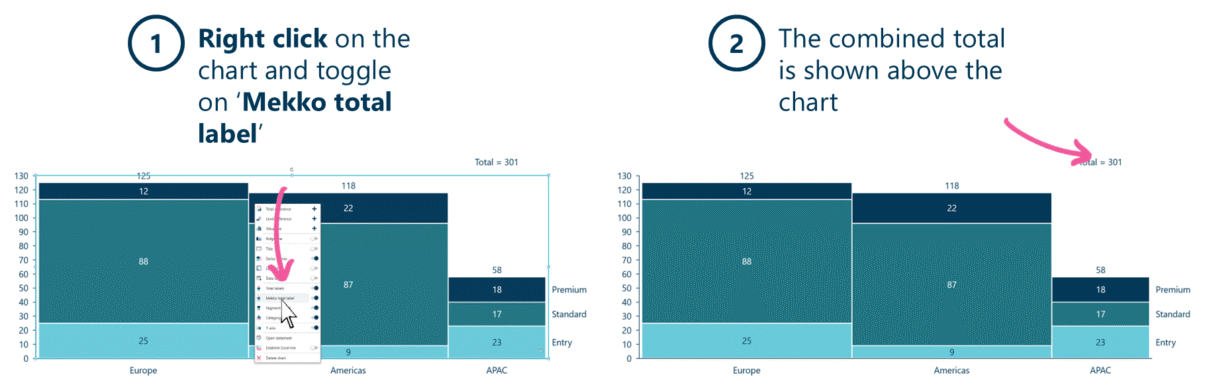
Toggle on Mekko total label to show the combined total above the chart.
- Right-click on the Mekko chart and toggle on Mekko total label.
- The combined total is shown above the chart.
When to use it
A Mekko sizes its segments by width × height, so it reads as a picture of proportions. The total label states the whole — the total market, spend or volume — so the audience can size the opportunity and read every segment as a share of a known number. Use it whenever the absolute total is part of the story.
How consultants use it
A Mekko is a proportion chart; the total label is what turns it into a sized one. A few practices apply:
- Always give the audience the total: a Mekko without its total leaves the reader unable to size the market; the label supplies the anchor every segment is read against
- Format the number to match the deck: currency, units and rounding consistent with the rest of the story, so the total reads as a headline figure
- Show the whole and the parts: pair the total label with segment labels so the reader has both the size of the market and the size of each piece
Proportions only mean something against a total — the label is what makes the Mekko’s shares add up to a real number.
Tips & best practices
- Show it whenever the market or category size is part of the message.
- Combine it with the ridge line and segment labels for scale, shape and detail.
- Keep the total’s formatting consistent with the rest of the deck.
Availability
Part of Ampler Charts, included in Ampler for PowerPoint and the Ampler Suite, on Windows desktop PowerPoint.
Frequently asked questions
How do you show the total on a Mekko chart in PowerPoint?
In Ampler Charts, right-click the Mekko chart and toggle on Mekko total label — the combined total of all columns appears above the chart.
What is the Mekko total label?
It is a single label showing the combined total of every column in a Mekko, so the reader can size the whole and read each segment as a share of that number.
When should you show the Mekko total?
Whenever the absolute size of the market or category is part of the argument — a Mekko shows proportions, and the total gives them a real scale.
How is it different from column total labels?
Column totals label each column’s value; the Mekko total label states the single combined total across all columns — the size of the whole.