
Ampler Charts can add a bracket over a Gantt activity to span and annotate a date range — grouping a set of tasks or marking a phase across the timeline.
Quick answer: Right-click a specific activity row and select Bracket from the context menu to insert a bracket, then select it and drag the handles to set its position and date range.
How to use it
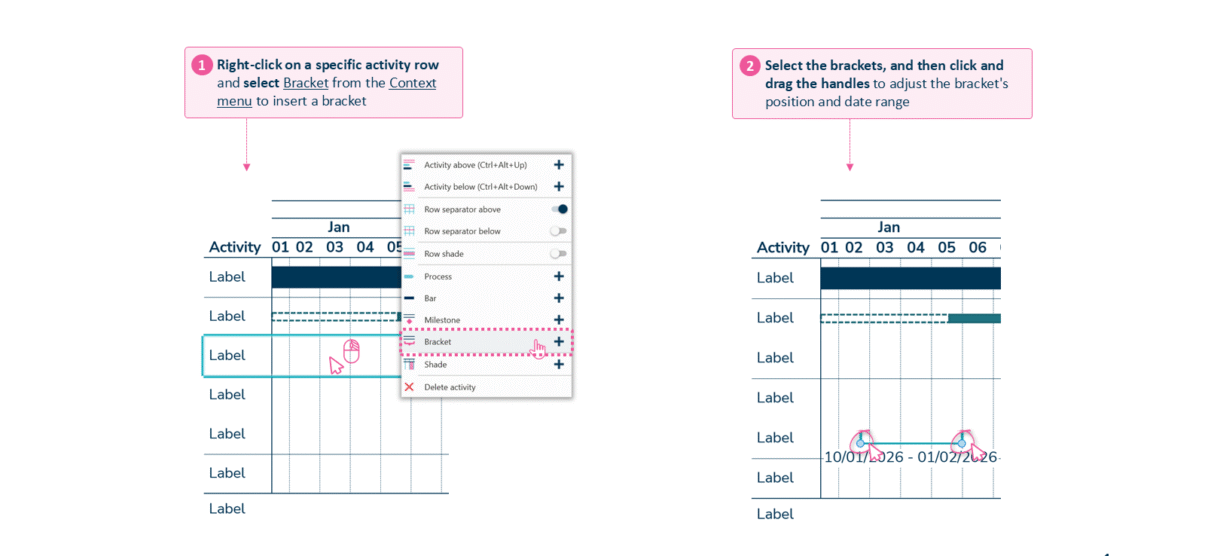
Right-click an activity and select Bracket, then drag the handles to set the span.
- Right-click a specific activity row and select Bracket from the context menu to insert a bracket.
- Select the bracket, then click and drag the handles to adjust its position and date range.
When to use it
Add a bracket to group activities under one phase or to call out a span — a mobilisation window, a testing period — so the timeline shows structure above the individual bars.
How consultants use it
Above the individual bars, a workplan reads better when its phases are visible, and brackets give a Gantt that structure. A few practices apply:
- Group activities into phases: a bracket spans several activities so a steering committee sees the phase, not just the tasks
- Annotate a span: the bracket makes a window explicit — a mobilisation or testing period, with its date range
- Show structure above the bars: the plan shows its shape, which is what an executive audience reads first
Brackets add a layer of structure that groups a Gantt’s activities into phases a client will recognise.
Tips & best practices
- Drag the bracket handles to line its span up with the exact date range.
- Use brackets to group tasks into phases a steering committee will recognise.
- Label the phase clearly so the bracket adds meaning, not just a line.
Availability
Part of Ampler Charts, included in Ampler for PowerPoint and the Ampler Suite, on Windows desktop PowerPoint.
Frequently asked questions
How do you add a bracket to a Gantt chart in Ampler Charts?
Right-click a specific activity row and select Bracket from the context menu, then drag the handles to set its span.
How do you change a bracket’s date range?
Select the bracket and drag its handles to adjust its position and the date range it covers.
What are brackets used for on a Gantt chart?
To group several activities into a phase or to annotate a span such as a mobilisation or testing window.
Can a bracket cover more than one activity?
Yes. Drag the handles so the bracket spans the range of activities you want to group under one phase.