
Ampler wraps selected formulas in IFERROR in one click — several at once, with a custom message — so a model shows a clean note instead of a raw error.
Quick answer: Select the cells to wrap and click Wrap IFERROR on the Ampler ribbon; Ampler wraps them all with your chosen error message.
How to use it
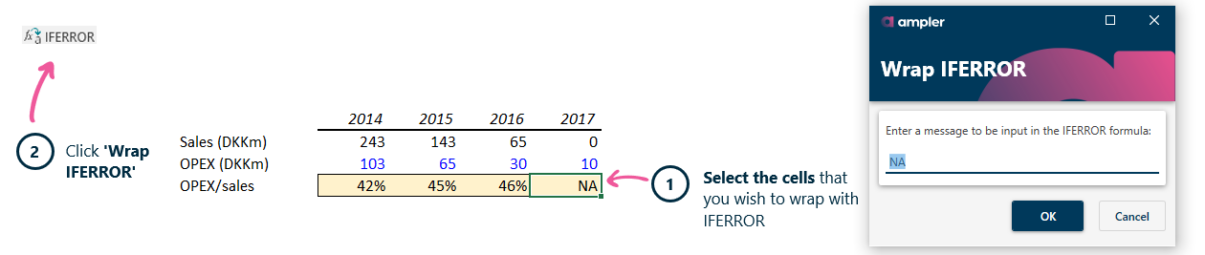
Select the cells, then Wrap IFERROR to handle errors cleanly.
- Select the cells you wish to wrap with IFERROR.
- Click Wrap IFERROR on the Ampler ribbon.
Ampler wraps every selected formula at once, so raw errors are replaced by a clean, consistent message.
Keyboard shortcut
Wrap IFERROR has no default shortcut. To assign one, open the Settings dropdown on the Ampler ribbon, choose Shortcuts, click Set shortcut on the function, and press your key combination.
Why use it
Wrapping formulas in IFERROR by hand — editing each one, adding the message, closing the bracket — is slow and easy to get wrong. Ampler wraps a whole selection at once with a consistent message, so a model degrades gracefully instead of showing #DIV/0! or #N/A.
How consultants use it
A client-facing model must never show a raw error, and error handling is expected to be consistent across it. Three conventions apply:
- No raw errors on show: formulas that can fail are wrapped so the output stays clean.
- A consistent message: the same error text is used throughout, not ad-hoc.
- Robust under change: the model handles missing or zero inputs gracefully.
Wrapping in IFERROR keeps a model clean and robust in one click.
Tips & best practices
- Wrap the formulas most likely to error — lookups and divisions.
- Use a consistent message so errors read the same across the model.
- Don’t hide errors you need to see while building — wrap at the finishing stage.
Availability
Included in Ampler for Excel and the Ampler Suite, on Windows desktop Excel.
Frequently asked questions
How do you wrap a formula in IFERROR in Excel?
Select the cells and click Wrap IFERROR on the Ampler ribbon. Ampler wraps every selected formula with a custom error message in one click.
How do you handle errors in multiple cells at once?
Select them all and use Ampler’s Wrap IFERROR — it wraps the whole selection at once.
How do you stop a model showing #DIV/0! or #N/A?
Wrap the relevant formulas in IFERROR with Ampler so a clean message shows instead of the raw error.