
Ampler colour-codes a sheet by formula pattern, so dragged and copied formulas, hard-coded constants, and one-off inconsistencies are visible at a glance for auditing.
Quick answer: Click Visualise formulas in selected sheets on the Ampler ribbon; Ampler applies a pattern overlay that reveals where formulas are consistent and where they aren’t.
How to use it
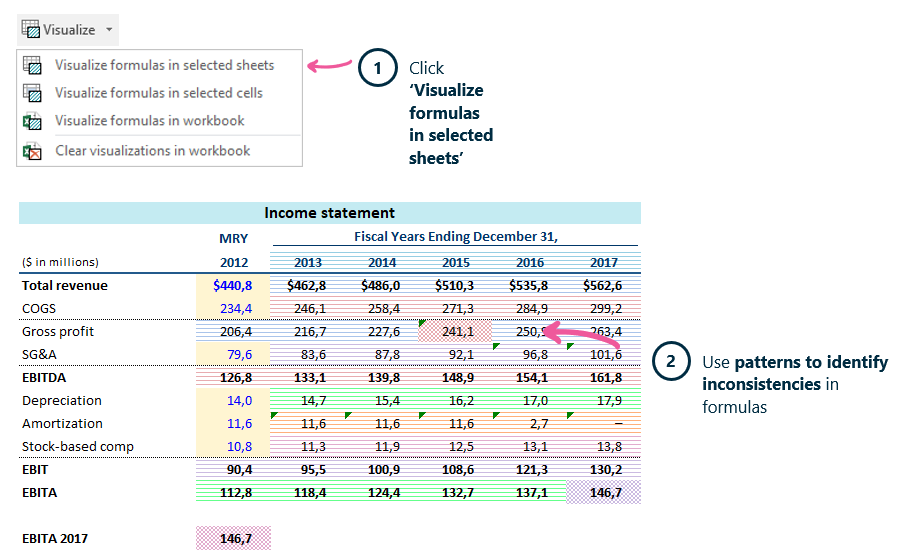
Apply the pattern overlay to reveal formula inconsistencies.
- Click Visualise formulas in selected sheets on the Ampler ribbon.
- Use the patterns to identify inconsistencies and hard-coded constants in the formulas.
The overlay gives an overview of dragged and copied formulas and shows clearly where constants are used, so you audit only the cells with unique formulas.
Keyboard shortcut
Visualise formulas has no default shortcut. To assign one, open the Settings dropdown on the Ampler ribbon, choose Shortcuts, click Set shortcut on the function, and press your key combination.
Why use it
Formula errors hide in plain sight — a hard-coded number in the middle of a formula row, a cell that breaks the pattern. Visualising the sheet by formula pattern makes those stand out immediately, so a whole worksheet can be audited at a glance.
How consultants use it
Model risk lives in inconsistency, and finding it by reading formulas one cell at a time is slow. A pattern overlay surfaces it at a glance. Three habits apply:
- Inconsistencies stand out: a cell that breaks the pattern is visible immediately.
- Hard-codes exposed: constants buried in formulas are flagged by the overlay.
- Audit the whole sheet fast: the pattern view covers a worksheet at a glance.
Visualising formulas turns a sheet audit into a look, not a read.
Tips & best practices
- Run it on any sheet you’re about to rely on.
- Investigate every cell that breaks the pattern — that’s where errors hide.
- Follow up on a specific cell with Inspect formulas.
Availability
Included in Ampler for Excel and the Ampler Suite, on Windows desktop Excel.
Frequently asked questions
How do you audit formulas in an Excel worksheet?
Click Visualise formulas in selected sheets on the Ampler ribbon. Ampler colour-codes the sheet by formula pattern, so inconsistencies and hard-coded constants stand out.
How do you find hard-coded numbers in formulas?
Ampler’s formula visualisation flags where constants are used inside formulas, so they’re easy to spot.
How do you spot formula inconsistencies in Excel?
Use Ampler’s pattern overlay — a cell that breaks the surrounding pattern is highlighted for review.