
The Ampler Charts data sheet has built-in functions — undo/redo, cut/copy/paste, insert and delete rows and columns, transpose, reverse, percentage, clear, format, and formulas — so you shape the data without leaving the chart.
Quick answer: Use the data-sheet toolbar for Undo/Redo, Cut/Copy/Paste, Insert/Delete row or column, Transpose, Reverse, Percentage, Clear, and Format — and write formulas as in a normal Excel sheet.
How to use it
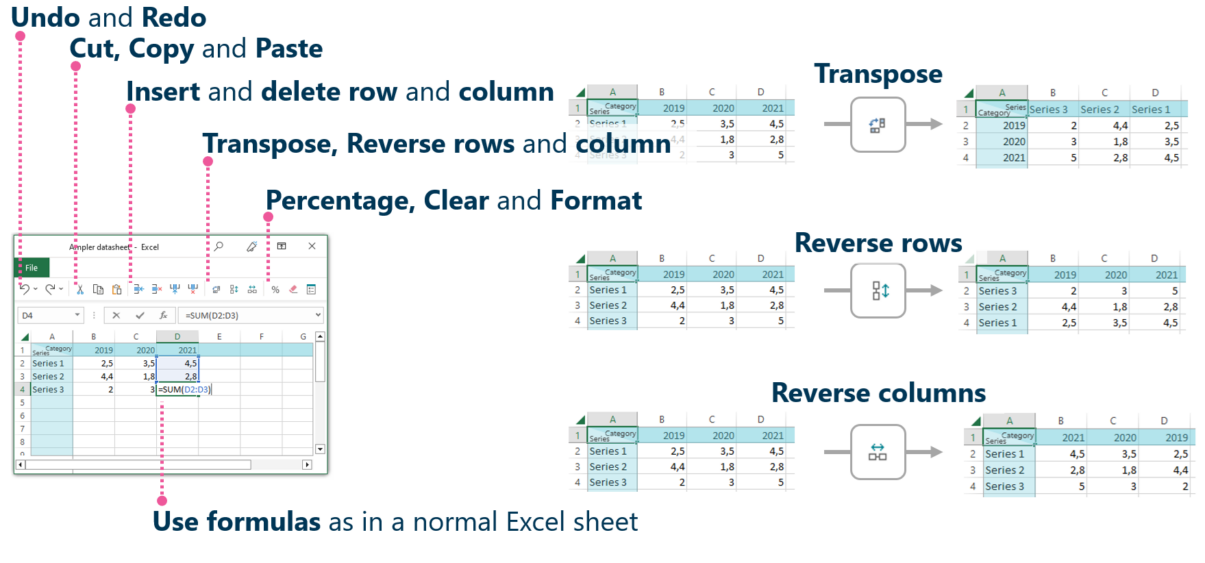
Use the data-sheet toolbar and formulas to shape the data.
- Open the chart’s data sheet.
- Use the toolbar for Undo/Redo, Cut/Copy/Paste, Insert/Delete row or column, Transpose, Reverse rows/columns, Percentage, Clear, and Format.
- Use formulas as you would in a normal Excel sheet.
The data sheet behaves like Excel, so you can restructure and calculate the chart’s data in place.
When to use it
Use the data-sheet functions for quick edits and transforms in place; go to a linked Excel model when the analysis is heavier or the data is shared.
How consultants use it
Shaping data to fit the chart is routine, and having Excel-like functions to hand keeps it fast. Three habits apply:
- Restructure in place: transpose and reverse reorient the data without leaving the chart
- Calculate as in Excel: formulas and percentages work as they do in a spreadsheet
- Quick fixes: insert, delete, and clear tidy the data fast
The data-sheet functions let you shape a chart’s data like a spreadsheet, in place.
Tips & best practices
- Transpose or reverse to reorient the data for the chart.
- Use formulas for calculated series rather than pre-computing elsewhere.
- Link to Excel when the analysis outgrows the data sheet.
Availability
Part of Ampler Charts, included in Ampler for PowerPoint and the Ampler Suite, on Windows desktop PowerPoint.
Frequently asked questions
What can you do in the Ampler Charts data sheet?
Undo/redo, cut/copy/paste, insert and delete rows and columns, transpose, reverse, percentage, clear, format, and write formulas as in a normal Excel sheet.
Can you use formulas in a chart’s data sheet?
Yes. The data sheet supports formulas just like a normal Excel sheet.
How do you transpose chart data?
Use the Transpose function in the data-sheet toolbar to swap rows and columns.
Should you edit data in the data sheet or in Excel?
Use the data sheet for quick, in-place edits; use a linked Excel model for heavier analysis or shared data.