
Ampler makes a table’s rows or columns equal in size in one click, so the grid is even instead of a patchwork of different heights and widths.
Quick answer: Select the table (or a range of cells) and click Distribute rows or Distribute columns on the Ampler ribbon to make them equal.
How to use it
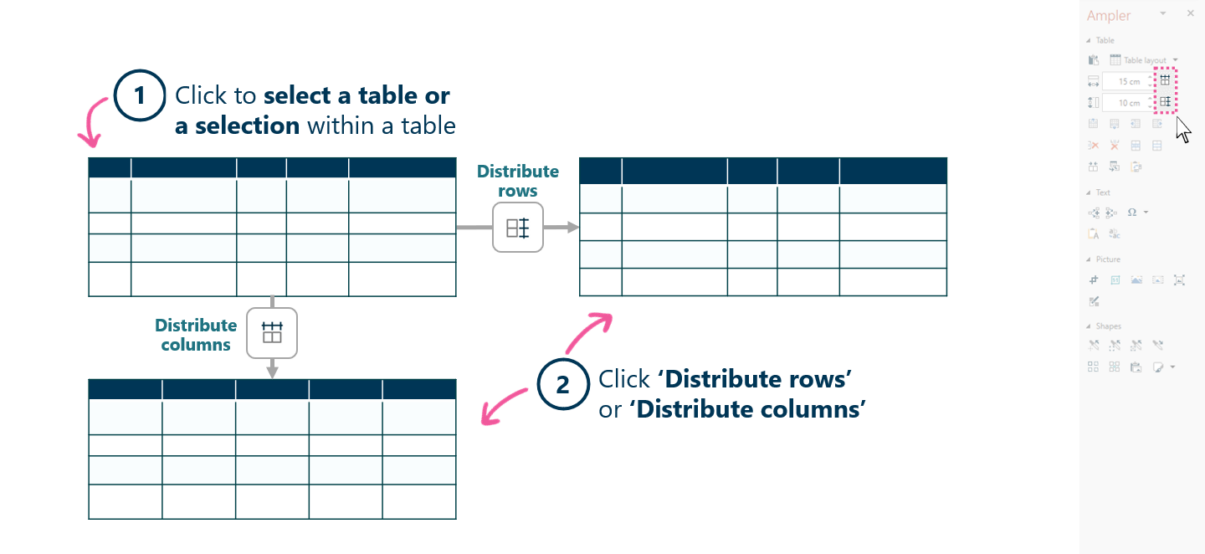
Select the table, then distribute rows or columns to equal sizes.
- Click to select a table, or a selection of cells within it.
- Click Distribute rows or Distribute columns on the Ampler ribbon.
The selected rows or columns become equal in size, so the grid reads as even.
Keyboard shortcut
These functions have no default shortcut. To assign one, open the Settings dropdown on the Ampler ribbon, choose Shortcuts, click Set shortcut on the function, and press your key combination.
Why use it
As a table is edited, rows and columns drift to different sizes, and dragging each border back to match is slow and imprecise. Distribute rows and Distribute columns make them exactly equal in one click, so the table looks deliberate.
How consultants use it
A table on a consulting slide is an exhibit, and an uneven grid reads as unfinished. Even rows and columns are a basic quality signal. Three habits apply:
- Even grid, deliberate look: equal rows and columns make the table read as composed.
- Consistent cell sizing: nothing is left slightly larger or smaller by accident.
- Fast tidy-up: one click replaces dragging every border.
Distributing rows and columns makes the grid even in a single step.
Tips & best practices
- Select only part of the table to distribute a specific range of rows or columns.
- Follow with Fit table columns if some columns should size to their content instead.
- Use Scan & Fix for a final consistency check.
Availability
Included in Ampler for PowerPoint and the Ampler Suite, on Windows desktop PowerPoint.
Frequently asked questions
How do you make table rows and columns equal in PowerPoint?
Select the table and click Distribute rows or Distribute columns on the Ampler ribbon. Ampler makes them equal in size in one click.
How do you even out an uneven table?
Use Ampler’s Distribute rows and Distribute columns to snap the grid to equal sizes, rather than dragging each border.
Can you distribute only part of a table?
Yes. Select a range of cells first, and the distribute function applies to just those rows or columns.
Doesn’t PowerPoint already distribute rows and columns?
PowerPoint’s Table Layout tab has Distribute Rows and Distribute Columns, but they act on the whole table. Ampler’s Distribute rows and Distribute columns can even out a selected range of rows or columns instead — useful when only part of the table is uneven.
Why won’t my rows distribute to an equal height?
A row cannot shrink below the height its content needs — a large font, wrapped text or an inserted image sets a minimum. Reduce the oversized content, or select only the rows you want evened, and they will distribute to a common height.