Unlock Bain-style PowerPoint productivity | Free for BeyondBain Alumni
Are you a former Bain consultant longing for the speed and precision of the Bain Toolbox in PowerPoint? You’re not alone! Ampler is a powerful PowerPoint productivity add-in, designed by ex-consultants, to replicate and enhance the features you loved at Bain.
Reclaim Bain-level PowerPoint efficiency
Ampler brings the advanced PowerPoint features you know and need from the Bain Toolbox right to your fingertips. Built specifically for consultants and strategy professionals, Ampler helps you work as smart and fast as you did during your time at Bain.
Here is what Ampler looks like:
The Ampler PowerPoint add-in originated from real-world consulting frustrations. Our founders, former Bain consultants, experienced firsthand the repetitive nature of PowerPoint tasks and the inefficiency in sourcing reusable slides. Over a decade ago, we introduced an early version to prominent Nordic consultancy QVARTZ (now part of Bain). Encouraged by enthusiastic feedback and requests for new features, the comprehensive Ampler suite was born.
Today, Ampler also includes dedicated tools for Excel, Word, Outlook, and powerful data visualization through Ampler Charts, making it the only comprehensive software solution tailored explicitly for consultants.
12 months free for BeyondBain
We’ve partnered with BeyondBain to offer Ampler to all former Bain employees! Here’s how to claim your FREE 12-month subscription to Ampler Suite:
Find the Productivity Tools section and click Access Resources.
Locate Ampler. You’ll be redirected to our sign-up page with instructions on how to download Ampler and get started.
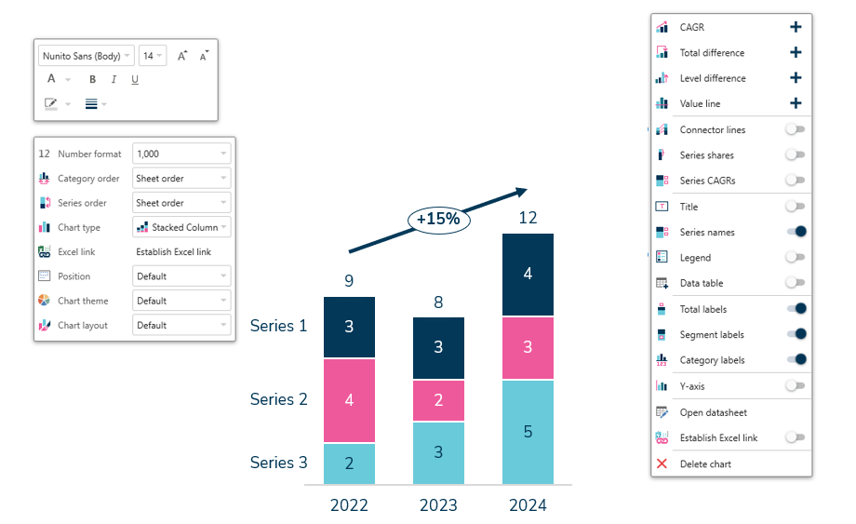
Easily visualize data with Ampler Charts
If you have been with Bain for a long time you are probably a super user of chart add-ins for PowerPoint and PowerPoint productivity tools. We have worked with both when we were consultants. We have taken our experience and made Ampler Charts which covers all the chart types commonly used by consultants and is fully integrated into Ampler for PowerPoint and Ampler suite, allowing you to use Amplers arrange, align, and adjust functions on our charts as well. Here is few high lights:
Over 40 customizable chart types including waterfall, column, bar, line, pie, scatter, Mekko, and combination charts
Effortlessly highlight insights with automated annotations, labels, legends, and decorations such as CAGR arrows and axis breaks
Maintain data consistency through seamless Excel integration and create Gantt charts directly within PowerPoint
Why ex-Bainies love Ampler
Here’s a selection of the powerful features Ampler provides to streamline your workflow, enhance productivity, and elevate your presentations:
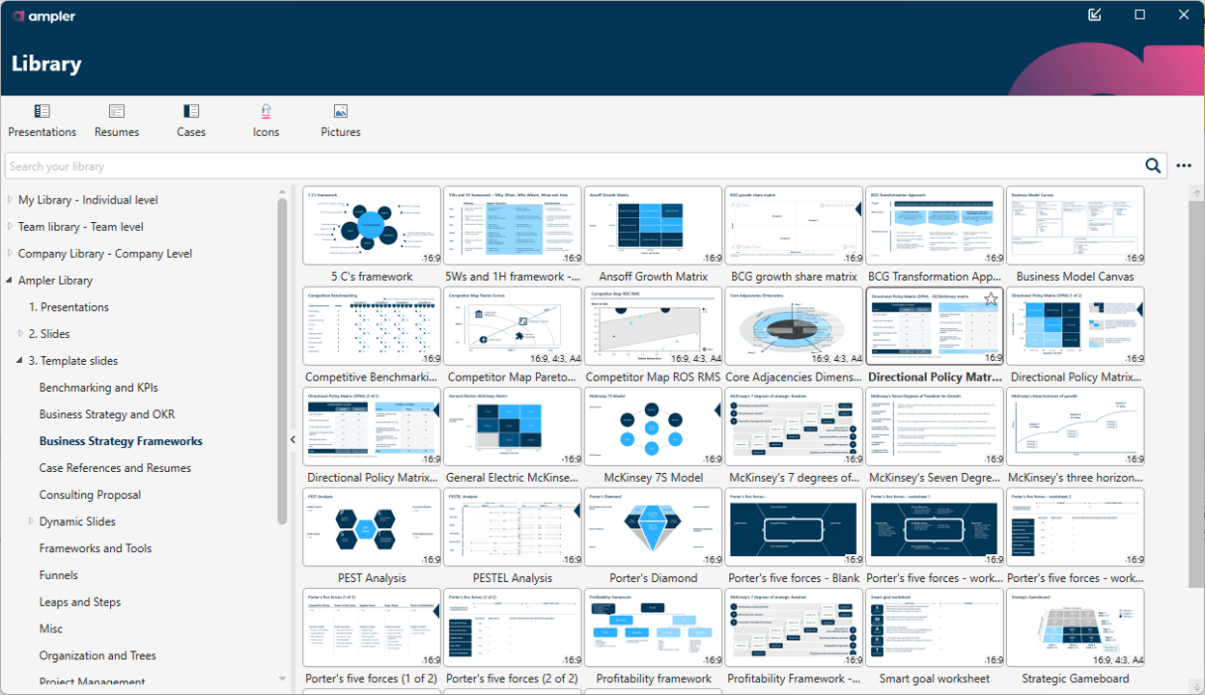
Extensive library for quick content reuse:
Share content seamlessly across your team or organization
Access to 8,000+ items including templates, slides, visual frameworks, editable world maps, country flags, customizable icons, and much more—fully searchable and auto-updating to match your template colors
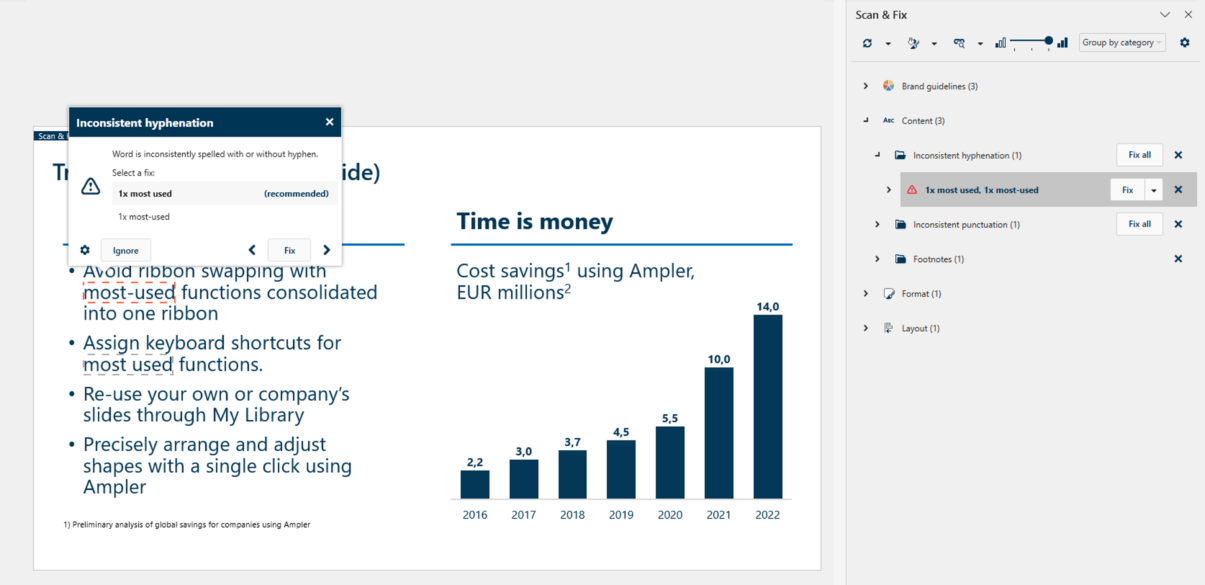
Scan & Fix tool for flawless, brand-compliant slides:
Automatically detect and fix common errors like inconsistent punctuation, footnotes, spacing, hyphenation, and capitalization
Ensure consistency with US/UK wording, brand colors, fonts, and more
150+ productivity-boosting features:
Storyboarding and agenda structuring
Easy alignment, resizing, and formatting tools
Magic select, quick swap positions, preformatted tables and more
Customizable shortcuts for all your favourite functions:
Pre-defined Bain shortcuts
Option to overwrite or add more
Ampler continually evolves based on user feedback, ensuring it remains the most efficient, consultant-focused PowerPoint add-in available.
This website uses cookies in order to improve the user experience. When you continue to use this site, you accept the use of cookies. Read more about our cookie policy here.