How To Create a Recommendation Slide Like a McKinsey Consultant
In this article, we’ll cover one of the most crucial parts of any consulting presentation: The recommendation slide. On this slide, consulting firms distil weeks of research and analysis into clear, actionable guidance to help clients solve a business problem. Even if you’re not a consultant, you can still apply the same principles used by consulting firms to communicate your own recommendations with clarity and impact.
We’ll explain what a recommendation slide is, how to create one, and how to communicate your recommendations. We’ll also share real examples from renowned consulting firms such as McKinsey, BCG, and Bain, helping you craft clear, compelling recommendations of your own.
What is a Recommendation Slide
The purpose of the recommendation slide is to present a clear, concise, and actionable set of responses aimed at achieving a defined goal set by a client. These recommendations are grounded in the analysis of issues and opportunities outlined in the preceding slides of a slide deck.
This slide is where the value of the consultant’s work becomes tangible, translating analysis into advice. It should not simply list ideas; instead, it must clearly explain why it’s the right strategic course of action based on the prior analysis. The slide must elevate these ideas into clear, focused recommendations that provide the client with a practical and results-driven path forward. To make the recommendations clear, specific, and results-driven, they should be written using action-oriented words such as “improve”, “target”, and “enhance”.
It’s important to remember the clear distinction between key takeaways and recommendations, as these are often confused. Key takeaways summarize the core insights from the analysis, while recommendations go a step further, offering concrete solutions.
Recommendation slides come in various slide types, with a simple slide with text being one of the most commonly used. Regardless of the format, a good recommendation slide should include a clear title and use bullet points or numbered lists to present the recommendations effectively. Remember, the purpose is to provide a clear, concise, and understandable overview of the initiatives an organization should undertake. Let’s look at some examples.
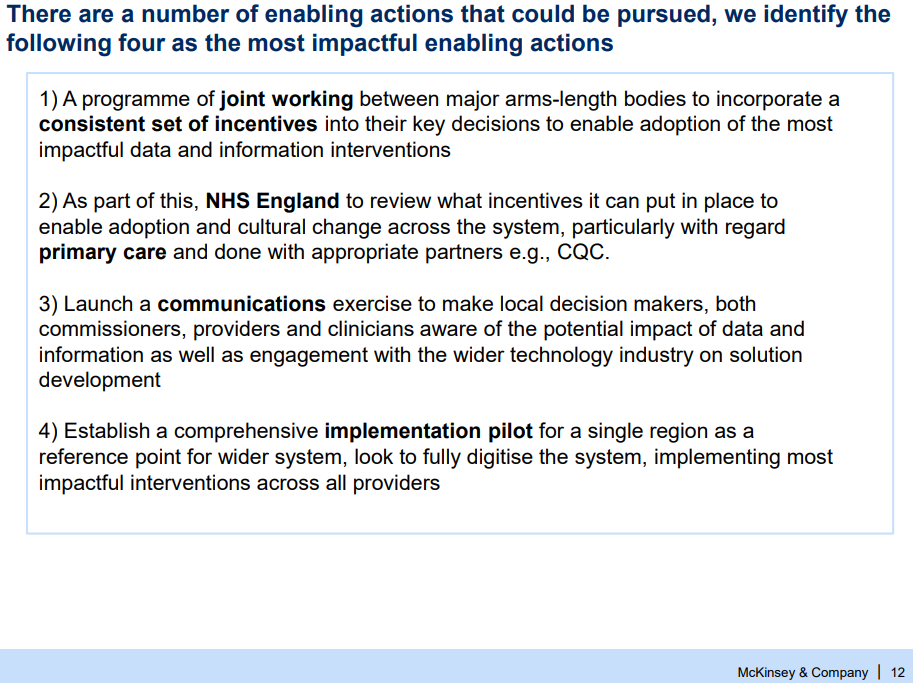
Our first example comes from McKinsey and features a set of recommendations for the NHS.
This is a classic, although rather simple, recommendation slide. However, it follows conventions by numbering the recommendations and using actionable words such as “establish” and “launch”. Despite its simplicity, the slide effectively communicates key strategic actions.
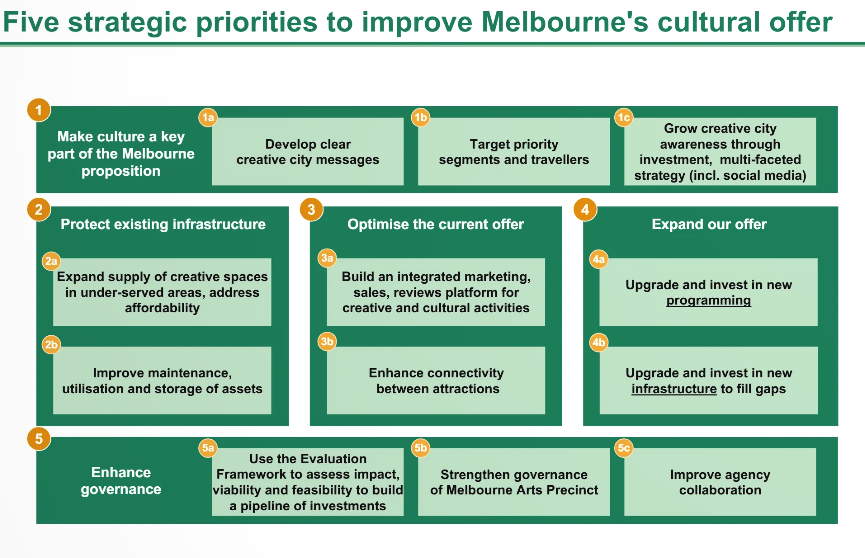
Another example, with a slightly different style, comes from BCG, where the recommendations are grouped according to the client’s outlined strategy. The numbering of each recommendation provides a clear overview, helping the audience follow the detailed explanation of the recommendations throughout the rest of the slide deck.
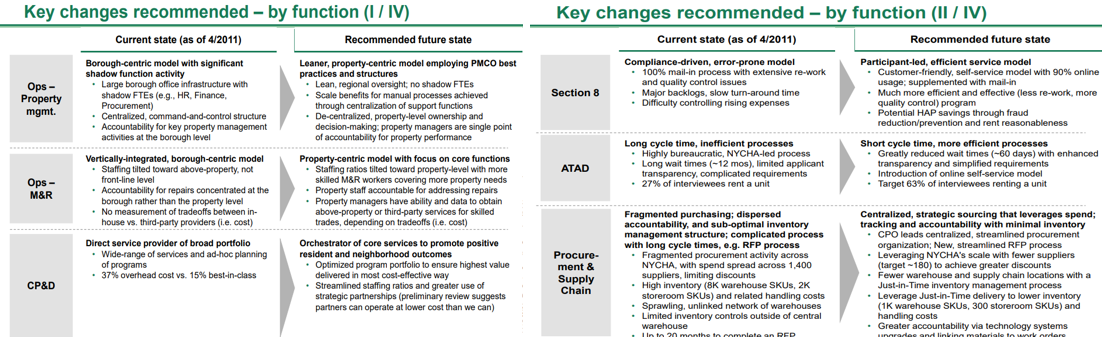
Sometimes, recommendations are spread across several slides, as demonstrated in this example:
These slides are a great example of how to structure multiple recommendations across different areas. They also outline both the current and future state, if the recommendations are implemented. This approach makes it clear to the client not only what to do, but also why it’s the right course of action.
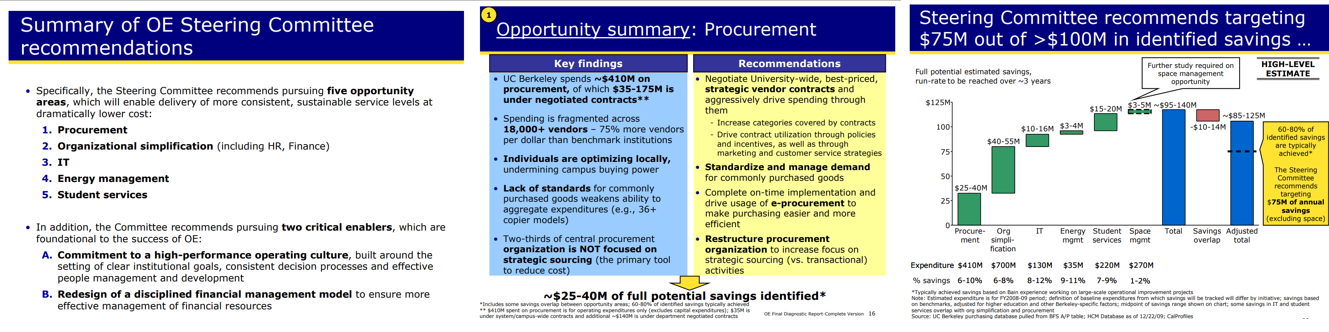
In our last example, the recommendations are summarized in five numbered opportunity areas. Each area includes a summary that highlights key findings and recommendations based on the prior analysis. At the end, the expected results of implementation are shown in a waterfall chart, emphasizing the areas with the greatest potential savings.
How to Create Recommendations Based on Data-Driven Insights
A great presentation of recommendations should always be supported by data and prior research, but how do you condense it into clear recommendations? Let’s break down the process.
Start by identifying the key issues or opportunities uncovered in your analysis. Prioritize these based on their potential business impact and feasibility. Recommendations should be specific, action-oriented, and results-driven. Avoid vague suggestions; instead, link each recommendation directly to a key insight identified earlier.
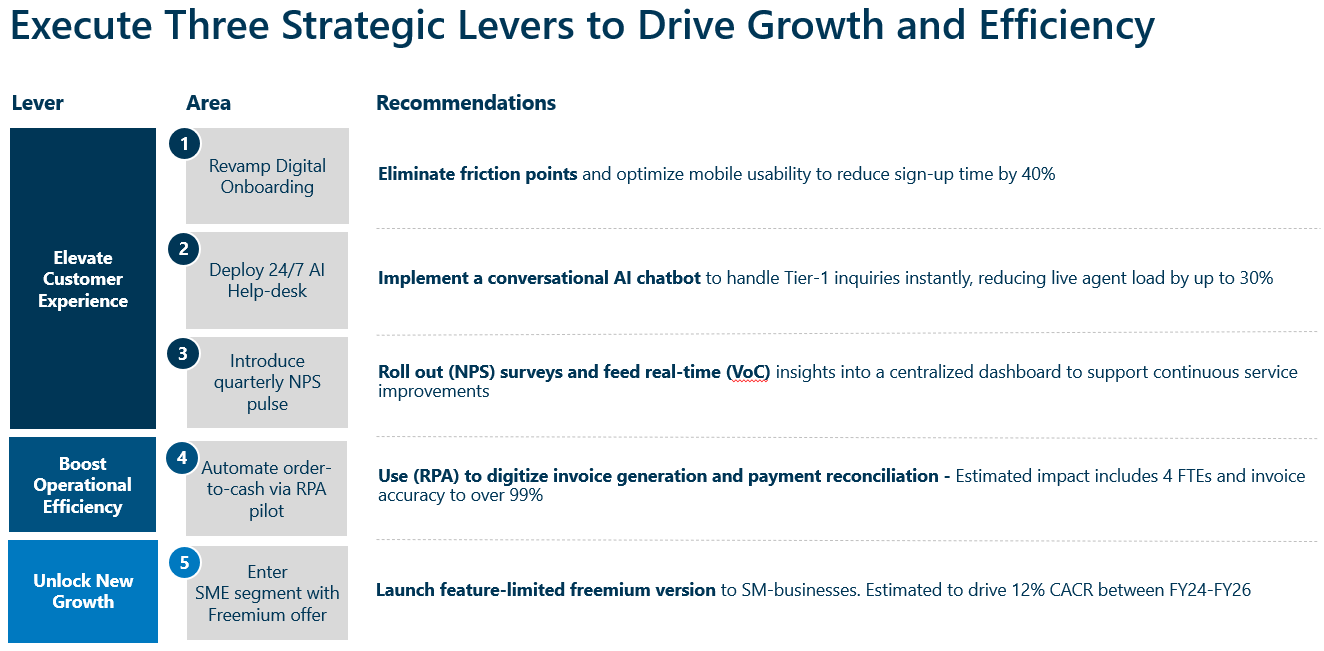
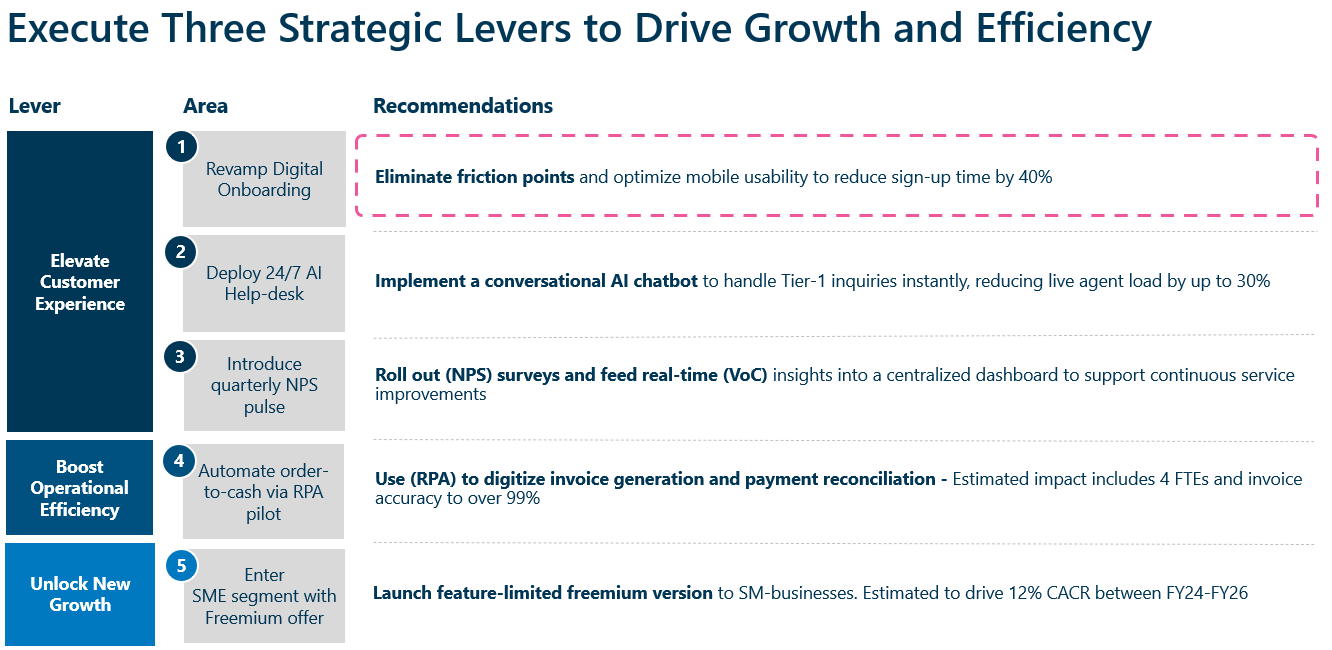
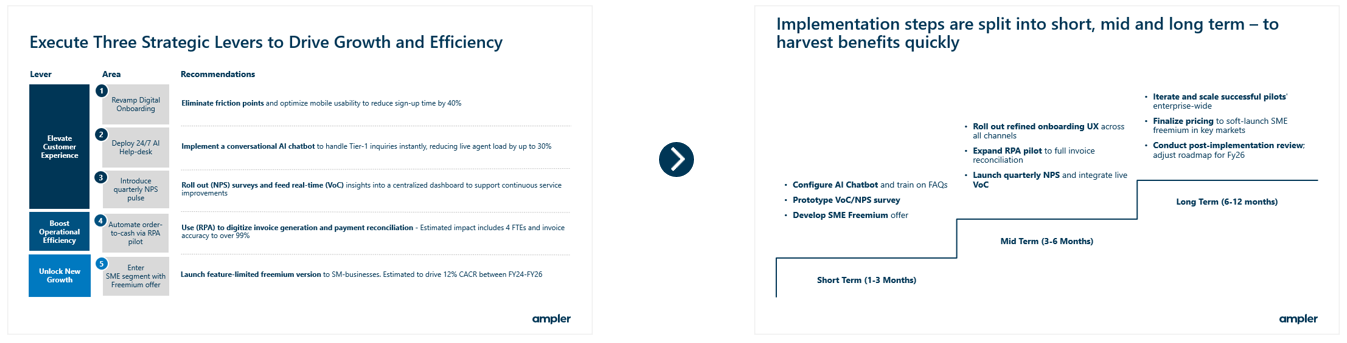
For example, if the issue lies in the digital onboarding process, the recommendation should address that directly: “Eliminate friction points and optimize mobile usability to reduce sign-up time by 40%”. This clearly shows how to craft a recommendation using strong, action-oriented language and the expected outcome of implementing it. This logical progression from insight to recommendation improves confidence in the recommendation’s viability.
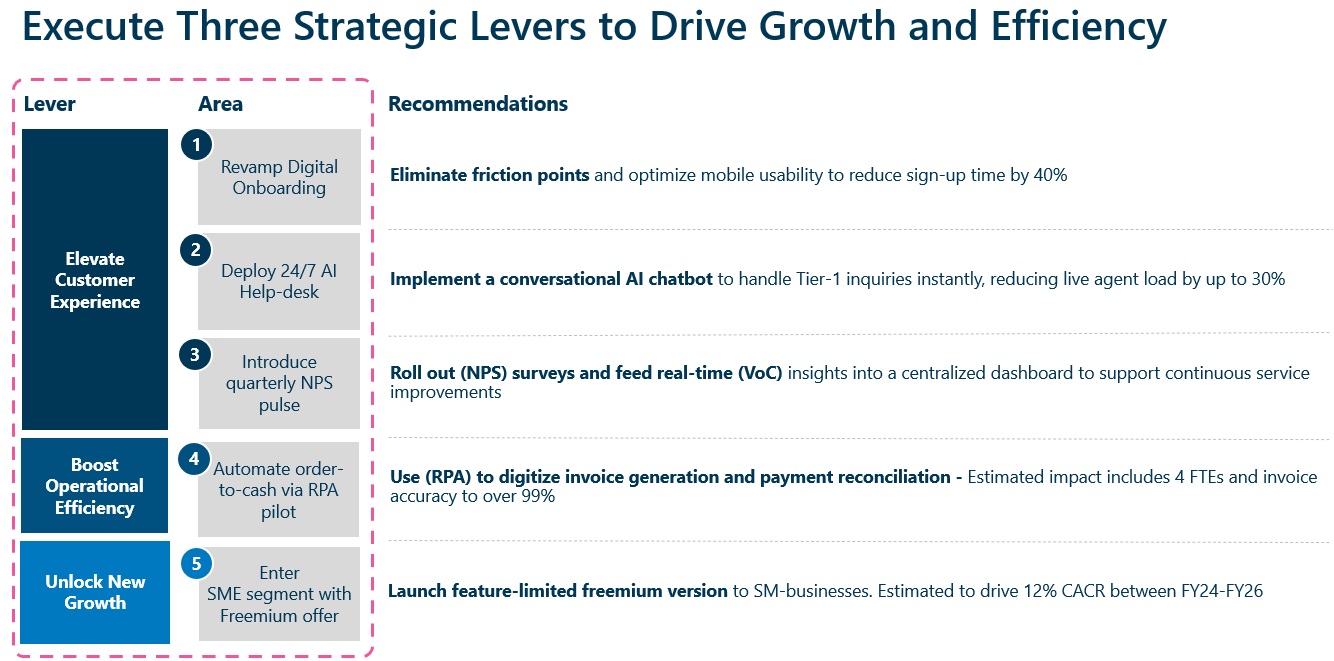
You can group recommendations logically, by business function, initiative type, or specific challenges identified earlier in the slide deck. In our example, it’s grouped by initiative type.
Finally, limit the number of recommendations to maintain focus, usually no more than 5-7 is ideal. Use numbered icons or labels to help the audience follow along. Keep detailed analysis in appendices; only the most critical information should be presented up front.
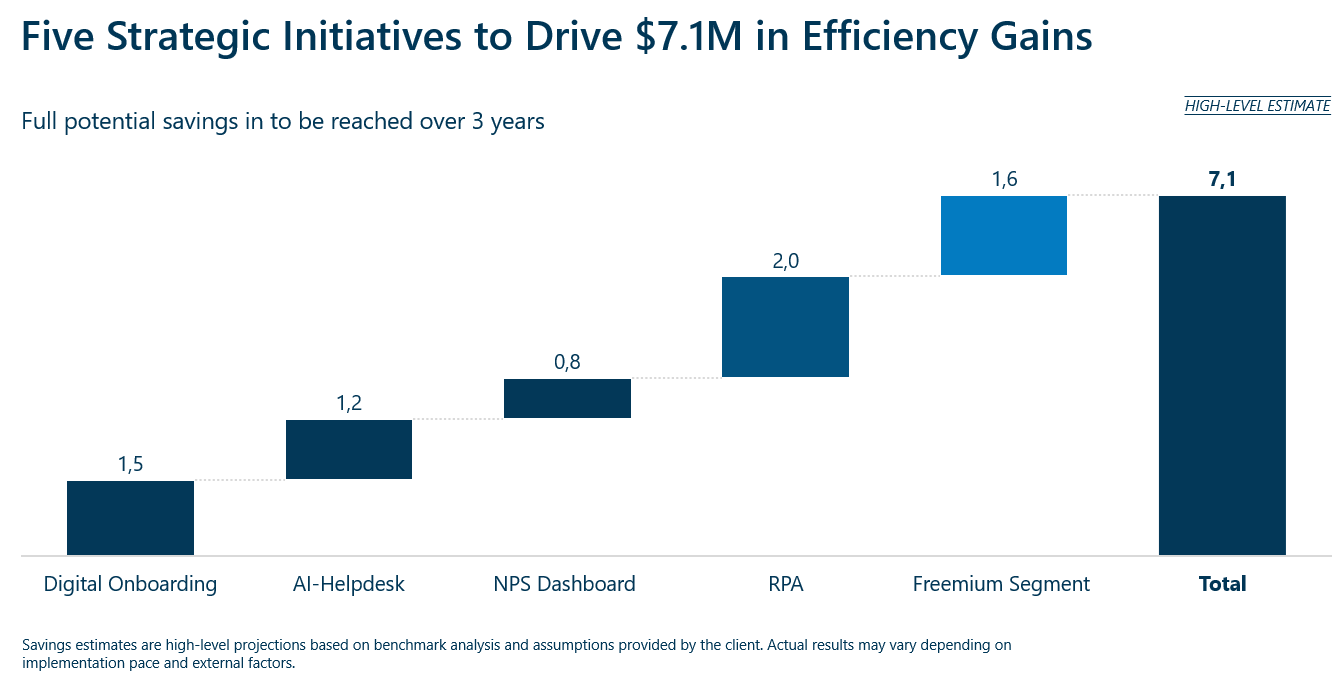
In the following slides, support your recommendations with visuals and graphics such as charts, diagrams, or expected financial outcomes. For example, a projected savings chart or ROI estimate can reinforce the message of the proposed actions.
Best Practices for Creating Recommendation Slides
Let’s summarize the best practices for creating a recommendation slide:
Use clear, action-oriented title with “answer first”-approach. For example: “Deploy AI Helpdesk to Reduce Ticket Resolution Time by 30%”
Apply the MECE principle to structure recommendations by theme or business lever to avoid overlap and ensure completeness
If quantify expected outcomes, use clear impact metrics, e.g., revenue uplift, cost savings, % time reduction
Use results-driven action verbs e.g., Revamp, launch, streamline, optimize
Keep text minimal and layout clean by using bullet points; avoid images and graphs
Support recommendations with data, tie it back to analysis presented earlier or include supporting data in the appendix
Common Questions About Recommendation Slides:
Let’s explore some typical questions surrounding recommendation slides
What is the Difference Between a Next Steps Slide and a Recommendation Slide?
Recommendation and next steps slides are often confused, but they serve distinct, yet complementary roles in a consulting presentation.
As stated before the recommendation slide outlines specific, strategic actions to solve a business problem. It answers the question: What should we do? – providing a clear direction based on the analysis.
In contrast, the next steps slide shifts from strategy to execution. It details the practical actions required to implement the recommendations, typically including a timeline, responsible stakeholders, and immediate priorities needed to move the strategy forward.
Below is an example of how specific recommendations are translated into a concrete next steps slide turning the recommendations into intermediate next steps.
How Many Recommendations Are Suitable?
Recommendations should be manageable to avoid overwhelming the audience. In consulting, the best practice is to highlight one clearly defined primary recommendation, often reflected in the action title.
This primary recommendation is typically supported by several sub-recommendations that collectively contribute to a single overarching objective. To maintain clarity, it’s recommended to limit the number of sub-recommendations to around three to five, ensuring the slide remains concise and easily digestible. To guarantee that recommendations are both non-overlapping and comprehensive, you can apply the MECE principle.
Where in the Slide Deck Should the Recommendation Slide Be Placed?
The recommendation slide is typically placed toward the end of the presentation, ideally immediately after the analysis and key takeaways section. This placement ensures that the audience fully understands the insights before seeing the proposed actions.
In addition to the recommendation slide, a condensed version, often called the executive summary, usually appears right after the title slide. It provides a brief, high-level overview of the key recommendations, giving the audience a preview of what’s to come.
What Comes After the Recommendation Slide?
While the recommendation slide typically appears toward the end of the slide deck, the presentation usually continues with an implementation plan outlining how to execute the recommendations, followed by a summary of expected benefits and potential risks. Finally, the deck concludes with a clear next steps slide and any supporting details in the appendices.
Get Ampler’s Consulting PowerPoint Templates
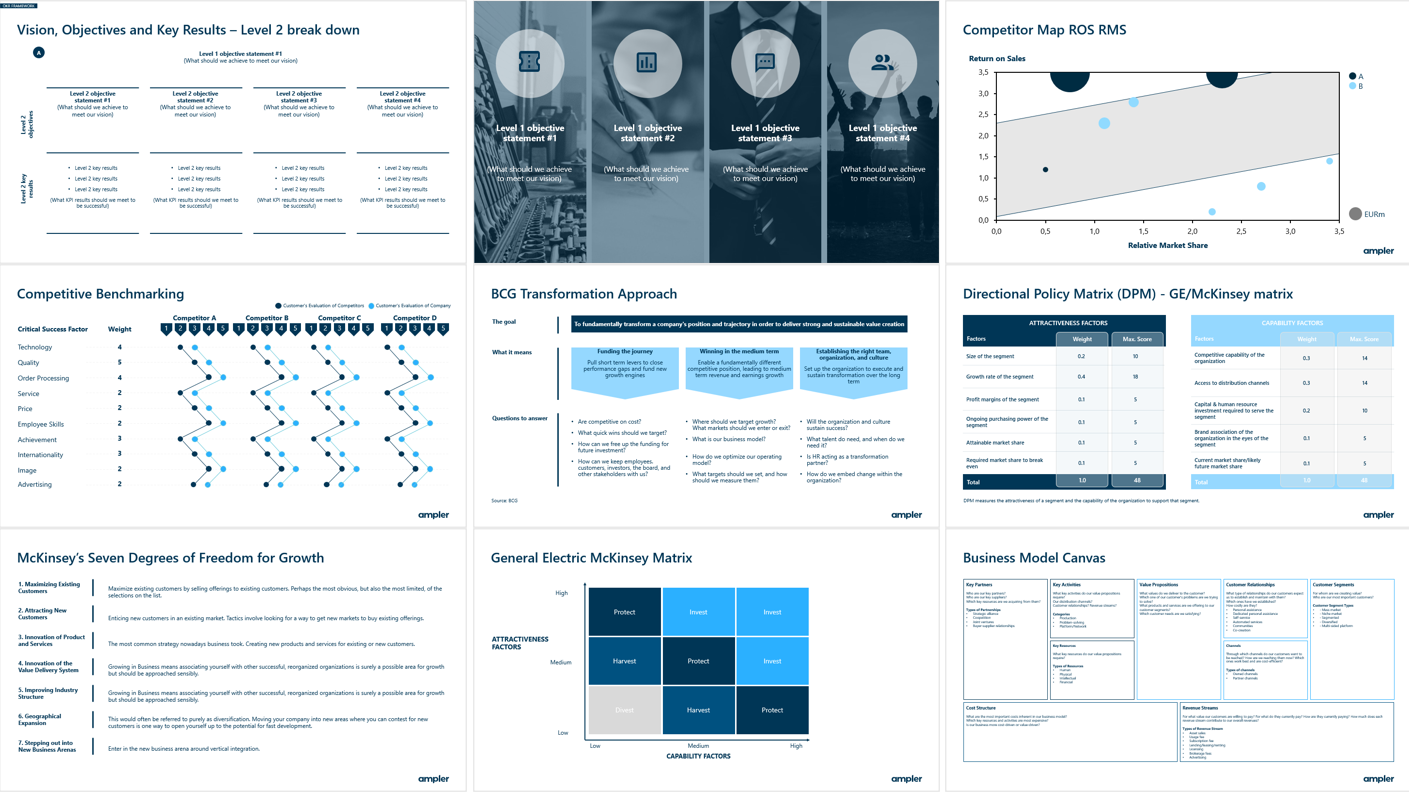
Producing clear, professional recommendation slides takes time, but you don’t have to start from scratch. Ampler offers its own library of free PowerPoint templates, including recommendation slides, next steps slides and strategic frameworks. In total, there are over 200 custom-made slide templates that can be easily incorporated into your corporate branding.
Whether you’re building a complete slide deck or simply need a well-structured recommendation slide, Ampler’s templates help you save time and present like a top-tier consultant.
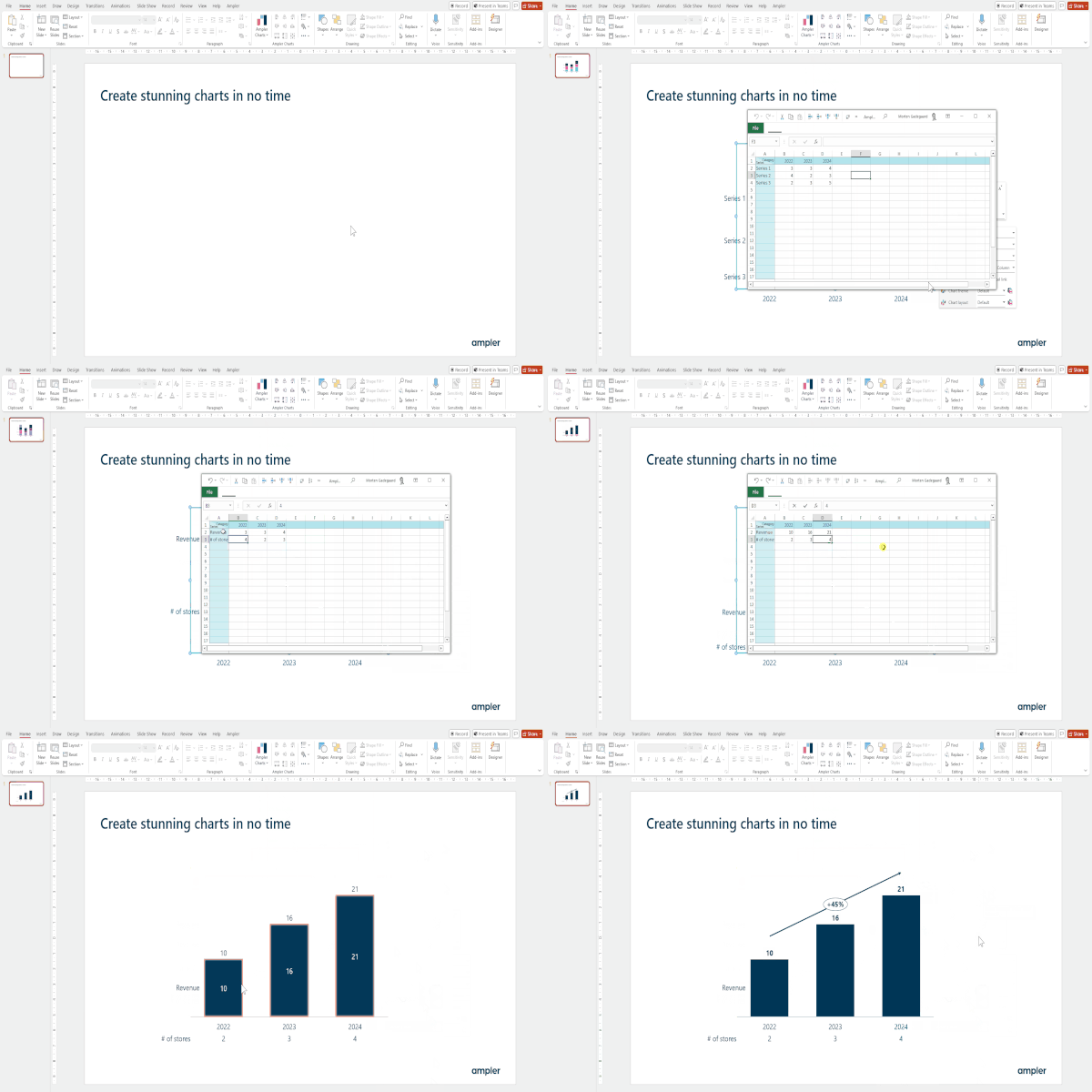
In addition, Ampler offers an integrated charting tool designed to enhance your presentations. It enables you to create impactful, fully customizable charts with flexible layouts, icon integration and flexible formatting options. The chart tool includes non-native PowerPoint charts including Gantt and Mekko charts.
To get free examples of full decks from McKinsey, BCG, and Bain, see the following articles:
This website uses cookies in order to improve the user experience. When you continue to use this site, you accept the use of cookies. Read more about our cookie policy here.