Customize Your Workflow With an Ampler PowerPoint Toolbar
Toggling between Multiple ribbons and tabs in PowerPoint wastes time every day. Ampler lets you create a customized toolbar tailored to your workflow, with all your most‑used tools in one place.
How to Customize Your Toolbar
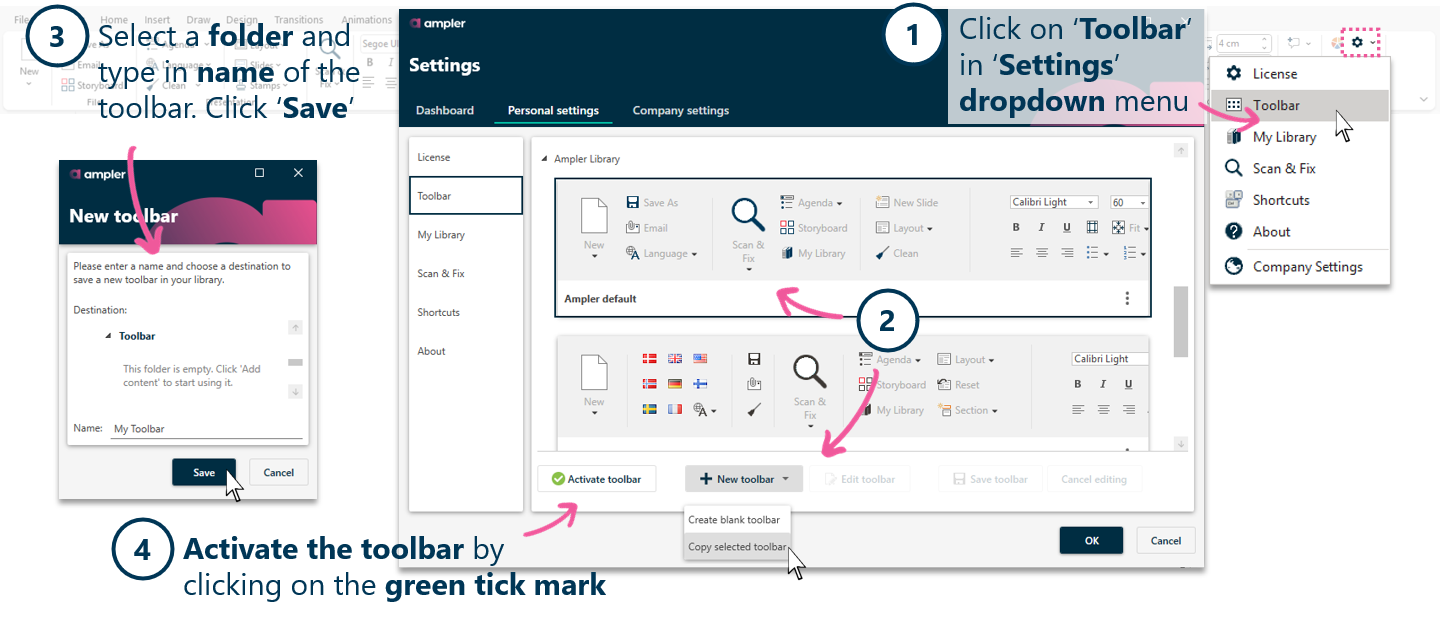
Open the Ampler toolbar designer in PowerPoint under Ampler>Settings>Toolbar.
Drag and drop tools you use most — like Scan & Fix, Insert from Library, align/distribute tools.
Save your toolbar layout and activate it.
Why It Helps
• No ribbon swapping — all tools are where you need them.
• Supports faster slide builds and fewer interruptions.
• Great for teams — share optimized toolbars with everyone.
Real‑World Tip
You can create multiple custom toolbars from the toolbar setup menu!
Ampler is a PowerPoint chart and productivity add-in for professionals.
What is a custom toolbar in Ampler?
A custom toolbar allows you to arrange your most-used PowerPoint tools — including Scan & Fix, Library access, and alignment tools — in a personalized toolbar for a faster workflow.
How do I create a custom toolbar?
Use the Ampler toolbar designer inside PowerPoint to drag and drop your preferred tools, organize them, and save and activate the toolbar.
Can I share a custom toolbar with my team?
Yes, you can share and distribute the toolbar configurations so your entire team can benefit from a standardized, productivity-optimized setup.
How does a custom toolbar improve productivity?
By having your most-used tools accessible in one place, you eliminate time wasted switching ribbons or searching menus, speeding up slide creation and editing.
Is toolbar customization reversible?
Yes, you can always reset or modify your toolbar layout as your workflow needs change, without affecting other PowerPoint settings.